If you are looking for LinkedIn profile photo tips, start with one simple question: does your current photo still look like you and reflect how you want to be seen professionally? A good LinkedIn profile photo should feel current, professional, natural, and confident without looking overly posed or heavily edited. Before you replace your photo, think about your expression, clothing, background, lighting, framing, and whether the image actually fits the professional impression you want to make. A little planning can help you choose a photo that feels comfortable and represents you well.
1. Ask If Your Current Photo Still Looks Like You
One of the first things to consider is how current your LinkedIn photo really is.
People change. Hairstyles change, glasses change, and sometimes your overall professional style changes too. If your profile photo is several years old, there may be a noticeable difference between the person in the photo and the person people meet today.
That can make your photo less useful as a first introduction.
Take a look at your current picture and ask yourself whether someone who has never met you would recognize you from it. If your appearance has changed significantly, an update may make sense. There is also a difference between looking current and trying to look younger or different. Your LinkedIn photo should represent where you are now. You want people to recognize you when they meet you, whether that happens in a meeting, an interview, or a professional conversation.
This is one of the most practical LinkedIn headshot profile pic tips because it has less to do with photography and more to do with being honest about what your current image communicates.
2. Think About the Impression You Want to Make
Before taking a new photo, think about the type of professional impression you want to create.
Your LinkedIn profile photo may be viewed by recruiters, clients, colleagues, potential employers, or people in your industry. You do not need a different photo for each person, but you should have a clear idea of what you want your image to communicate.
Do you want to come across as approachable? Confident? Calm? Serious? Friendly? Experienced? Your expression can influence how the photograph feels. A relaxed expression may make you seem more approachable, while a more focused expression can create a more serious feel.
This does not mean you need to force a certain expression. In a professional studio, expression coaching can help you find something that feels natural rather than holding a smile that does not feel like you. The goal is not to create a character. It is to show the professional version of yourself that people can expect to meet.
3. Choose Clothing That Makes Sense for Your Work
What you wear matters, but there is no single outfit that works for every professional.
Think about what you normally wear in your work environment and what you want your profile to communicate. A lawyer, consultant, creative professional, executive, and job seeker may have very different ideas about what looks appropriate. Choose something that fits well and makes you feel comfortable. Solid colors can keep attention on your face, while simple patterns can prevent the clothing from becoming the main focus of the image.
It is also worth bringing an extra option if you are having your photo taken in a studio. You may see one outfit on camera and realize that another one represents you better. Try not to choose clothing simply because you think it looks professional in theory. If you rarely wear something, you may feel uncomfortable in it, and that discomfort can show in your expression and posture. A professional photograph should still feel like you.
4. Pay Attention to the Background and Studio Lighting
The background is easy to overlook because your attention naturally goes to your face. However, it can change how the entire image feels.
For a LinkedIn profile photo, you generally want the background to support the subject rather than compete with it. Distracting objects, clutter, or strong visual elements can pull attention away from your face.
This is one reason studio photography can be useful. A professional studio gives the photographer control over the setting and studio lighting, so the image can be created with its professional use in mind.
Good lighting should help your face look clear and natural. It should also work with your features rather than creating distracting shadows or an uneven appearance. You do not need to understand the technical side of studio lighting to get a useful photograph. That is part of the photographer’s job. Your job is to arrive prepared and communicate what you are looking for.
5. Think About Your Expression, Not Just Your Smile
One of the most common mistakes people make when taking a professional photo is thinking they have to smile in a particular way.
You do not necessarily need a big smile. You also do not need to look completely serious.
What matters is whether your expression feels genuine. A good studio photographer can provide expression coaching and posing guidance throughout the session. Small changes in your eyes, mouth, head position, and posture can make a noticeable difference in how the image feels.
You may also find that your first few expressions do not feel right. That is normal. It can take a little time to relax in front of a camera, especially if you are not used to having professional photos taken.
Instead of trying to hold one expression for the entire session, work with the photographer and try a few options. You may be surprised by which one feels most like you when you see the finished images. When considering tips for LinkedIn profile photo updates, this is one area worth taking seriously. Your expression can communicate just as much as your clothing or background.
6. Make Sure the Framing Works for LinkedIn
A photograph can look good as a large image and still not work well as a small LinkedIn profile photo. LinkedIn displays profile photos in a relatively small space. That means your face needs to remain clear and easy to recognize when the image is reduced.
This is where framing becomes important.
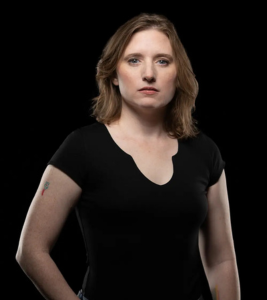
A professional headshot should give enough attention to your face without making the image feel awkwardly tight. Your head and shoulders should be positioned in a way that works when the image is cropped for your profile.
This is also something to keep in mind if you are using an older photograph that was originally taken for another purpose. A picture that worked well as a larger social media image may not have the right framing for LinkedIn.
Before choosing your final image, look at it in the same kind of small display where people will actually see it. If your face becomes difficult to see or important details disappear, consider another option.
7. Avoid Overediting Your Photo
Editing can help clean up a professional photograph, but there is a line between making small adjustments and changing how you actually look.
Your LinkedIn photo should still feel recognizable.
Heavy smoothing, dramatic changes to facial features, or excessive editing can make the image feel less natural. If someone meets you after seeing your profile, you want the photograph to feel like an accurate representation of you. Professional retouching can be useful for small refinements while keeping your natural appearance intact. The purpose is not to create a completely different version of yourself.
This is an important part of good LinkedIn photo advice because people sometimes focus too much on making a picture look flawless. A professional image does not have to remove every natural detail from your face.
A little realism can make a photograph feel more natural.
8. Consider Whether It Is Time for a Professional Headshot
If you have tried taking your own LinkedIn photo and still do not feel comfortable with the result, it may be worth considering a professional studio session.
Taking a usable photo with a phone sounds simple until you start thinking about lighting, camera position, background, posture, expression, and framing at the same time. You may end up taking dozens of pictures and still not know which one actually works.
A studio session takes much of that guesswork out of the process.
A professional headshot photographer in Chicago can guide you through posing, expression, lighting, and framing instead of expecting you to know what to do in front of the camera. At a professional photography studio in Chicago, the session can also be planned around how you intend to use the final image.
That guidance can be especially helpful if you tend to feel awkward in front of a camera. The point is not that you have to hire a photographer every time you update LinkedIn. If you have a recent photo that represents you well, you may already have what you need. But if your current image is outdated, poorly framed, or does not feel like you, a studio session can give you a fresh starting point.
Final Thoughts on LinkedIn Headshot Profile Pic Tips
Updating your LinkedIn photo does not mean completely changing the way you present yourself professionally. Start by considering whether your current image is still accurate, professional, and recognizable. Pay attention to details such as your clothing, expression, lighting, background, framing, and level of editing, as each can influence how your profile is perceived.
When it comes to LinkedIn headshot profile pic tips, the most effective choices are often the simplest. Use a recent photograph that clearly shows your face, choose a professional appearance that feels comfortable, and keep the overall image clean and focused. Your headshot should look polished while still feeling authentic to you.
If your current photo no longer reflects your professional image, a studio session can be a great opportunity to create an updated portrait with professional guidance. The goal is not to make you look like someone else, but to present a confident and approachable version of yourself that accurately represents who you are today.
Ready to refresh your LinkedIn profile photo? Schedule a professional studio headshot session with Aaron Gang Photography and create an image you can feel confident sharing.
Frequently Asked Questions
How Do You Know You Have a Good LinkedIn Profile Photo?
A good LinkedIn profile photo should make you recognizable, look current, and fit the professional setting without feeling overly formal or artificial. Look for an image where your face is clear, the framing works at a small size, the background is not distracting, and your expression feels natural.
Should You Smile in a LinkedIn Profile Photo?
There is no single expression that works for every person. A smile can make a photo feel warm and approachable, while a calm or focused expression may suit some professionals better. The important thing is that your expression feels natural and fits the professional image you want to communicate.
How Often Should You Update Your LinkedIn Profile Photo?
There is no fixed schedule for updating your LinkedIn photo. Consider replacing it when your appearance has changed, the photo feels dated, or it no longer represents your current professional image. You may also want to update it if the image is blurry, poorly cropped, or heavily edited.
What Should I Wear for a LinkedIn Headshot?
Choose clothing that fits your profession and feels comfortable. Simple clothing can help keep attention on your face, while an extra outfit can give you another option during a studio session. Your clothing should feel like a natural part of your professional style rather than something you would not normally wear.
Can a Professional Photographer Help With LinkedIn Photo Advice?
Yes. A professional photographer can guide you with studio lighting, framing, posing, and expression. During a studio session, this guidance can help you feel more comfortable in front of the camera and create an image that works well for your LinkedIn profile.